Learn how to measure your laptop screen size correctly, compare common laptop display sizes, and find the right replacement laptop screen for your model.
Laptop screen sizes have changed a lot over the years. Older laptops were often built around familiar sizes such as
13.3 inch, 14.0 inch, 15.4 inch, 15.6 inch and
17.3 inch. Modern laptops now use a much wider range of display sizes, including
13.4 inch, 13.5 inch, 13.6 inch, 13.8 inch,
14.2 inch, 14.5 inch, 15.0 inch, 15.1 inch,
15.3 inch, 16.0 inch, 16.2 inch and 18.0 inch.
If you are replacing a broken laptop screen, the screen size is only the starting point. Two screens can be the same
size but still have different resolutions, connectors, brackets, refresh rates, finishes or touch assemblies. This
guide explains how to measure your laptop screen correctly and what to check before ordering a replacement.
How to Measure a Laptop Screen Size
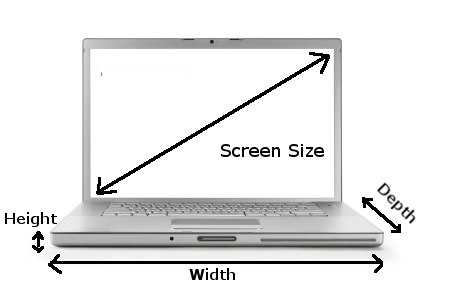
Laptop screens are measured diagonally, from one corner of the visible display area to the opposite corner. You should
measure only the glass area of the display, not the plastic bezel, outer frame or laptop lid.
The most common mistake is including the border around the screen. The second most common mistake is measuring the
screen from left to right horizontally. To get the correct size, measure the visible display area diagonally from
bottom-left to top-right, or from top-left to bottom-right.
If the screen has already been removed from the laptop lid, do not include the thin metal frame around the panel.
Measure the glass/display area only.
Why the Advertised Laptop Size Can Be Misleading
Laptop manufacturers often round screen sizes for marketing. For example, a laptop sold as a “14 inch laptop” may
actually use a 14.0 inch, 14.2 inch, 14.4 inch or
14.5 inch screen. A “15 inch laptop” may use a 15.0 inch,
15.1 inch, 15.3 inch, 15.4 inch or 15.6 inch
display.
This is why you should not order a replacement laptop screen based only on the laptop’s advertised size. Always check
the exact laptop model number and, where possible, the screen part number printed on the back of the original panel.
Common Laptop Screen Sizes
The table below includes older screen sizes that may still be found in replacement screens, as well as newer sizes
used in modern laptops.
| Screen size |
Where it is commonly found |
Current notes |
| 7.0 inch to 10.1 inch |
Tablets, older netbooks and small convertible devices |
Mostly older or specialist devices, although some tablet-style machines still use these sizes. |
| 11.6 inch |
Chromebooks, education laptops and compact laptops |
Still found in budget, education and portable devices. |
| 12.0 inch to 12.5 inch |
Older ultraportables and compact business laptops |
Often model-specific, so the exact part number is important. |
| 13.1 inch |
Older Sony and specialist laptops |
Now uncommon and usually difficult to source. |
| 13.3 inch |
Ultrabooks, compact laptops and older MacBook models |
Still common, but now joined by newer 13.4, 13.5, 13.6 and 13.8 inch sizes. |
| 13.4 inch |
Premium thin-and-light laptops |
Often used in slim-bezel laptops with modern screen ratios. |
| 13.5 inch |
3:2 productivity laptops |
Common on laptops designed for office work, browsing, coding and documents. |
| 13.6 inch |
Modern ultraportable laptops |
Used on some newer slim laptops, including modern MacBook Air models. |
| 13.8 inch |
Modern productivity laptops |
A newer size used by some premium Windows laptops. |
| 14.0 inch |
Business laptops, ultrabooks and everyday laptops |
One of the most common modern laptop screen sizes. |
| 14.1 inch |
Older business laptops |
An older standard mostly replaced by 14.0 inch screens. |
| 14.2 inch |
Apple MacBook Pro 14 inch models |
A modern Apple size. Do not assume a 14.0 inch replacement will fit. |
| 14.4 inch to 14.5 inch |
Premium laptops, creator laptops and some specialist models |
Less common than 14.0 inch, but increasingly used in high-end machines. |
| 15.0 inch |
Older laptops and some specialist machines |
An older size standard. Still worth listing because some replacement panels are model-specific. |
| 15.1 inch |
Older laptops and specialist models |
Less common than 15.0, 15.4 and 15.6 inch, but should be checked when replacing older screens. |
| 15.2 inch |
Older Apple laptops |
Mostly an older Apple-related size and usually model-specific. |
| 15.3 inch |
Modern 15 inch MacBook Air models |
A newer Apple size. Do not confuse it with 15.4 or 15.6 inch screens. |
| 15.4 inch |
Older widescreen laptops and older Apple models |
Once very common, but now mostly replaced by newer widescreen standards. |
| 15.6 inch |
Mainstream laptops, budget laptops, business laptops and gaming laptops |
Still one of the most common replacement laptop screen sizes. |
| 16.0 inch |
Modern creator laptops, gaming laptops and productivity laptops |
Now common on many newer laptops, especially models using taller 16:10 displays. |
| 16.2 inch |
Apple MacBook Pro 16 inch models |
A modern Apple size. Do not confuse it with 16.0 or 16.4 inch screens. |
| 16.4 inch |
Older Sony and specialist multimedia laptops |
Usually model-specific and often uses non-standard connections or fittings. |
| 17.0 inch and 17.1 inch |
Older large laptops |
Older standards that are now less common and often harder to source. |
| 17.3 inch |
Large laptops, gaming laptops and desktop replacement laptops |
Still common in larger performance laptops. |
| 18.0 inch |
Modern high-end gaming laptops |
A newer large-format size used in some current gaming machines. |
| 18.4 inch |
Older large gaming and specialist laptops |
Mostly older and specialist. Do not assume it is interchangeable with 18.0 inch panels. |
Screen Size Is Only One Part of Compatibility
Once you know the screen size, you still need to check the rest of the specification. A 15.6 inch replacement screen,
for example, may be available in several different versions that are not interchangeable.
Resolution
Common laptop screen resolutions include HD, Full HD, WUXGA, QHD, 2.8K, 3K and 4K. The safest option is usually to
match the resolution of the original screen unless you know your laptop supports an upgrade.
Connector type
Many modern laptop screens use eDP connectors, but the connector can vary by pin count, position and cable type.
Common examples include 30-pin and 40-pin connectors.
Mounting type
Some screens use side brackets, some use top-and-bottom brackets, and many newer slim panels use adhesive mounting
strips instead of screws.
Touchscreen or non-touchscreen
Touchscreen laptops often use a different display assembly from non-touch models. Do not order a non-touch panel for
a touchscreen laptop unless you are sure it is compatible.
Screen finish and panel type
Replacement screens may be matte, glossy, IPS, OLED, mini-LED, high-brightness or edge-to-edge glass. These versions
may look similar online but can require different replacement parts.
Modern Display Features to Check
- 16:10 and 3:2 aspect ratios: These taller screens are now common on productivity laptops.
- OLED displays: Often used in premium laptops and not always interchangeable with standard LCD panels.
- High refresh rates: Gaming laptops may use 120Hz, 144Hz, 165Hz, 240Hz or higher refresh-rate screens.
- Touch digitiser: Touch models may require a complete display assembly rather than just the LCD panel.
- Rounded display corners: Used on some modern displays, including some Apple screens.
- Adhesive-mounted panels: Many slim laptops no longer use traditional screw brackets.
How to Find the Correct Replacement Laptop Screen
The best way to find the correct replacement is to search by your laptop model number or by the part number printed
on the back of the original screen. The model number is usually printed on the base of the laptop, under the battery,
on the original box or in the system information screen.
If the screen has already been removed, check the label on the rear of the panel. This label usually contains the
exact screen model or part number, which is often the most reliable way to match a replacement.
Frequently Asked Questions
Do I measure the screen or the whole laptop?
Measure only the visible display area. Do not measure the full laptop lid or the plastic border around the display.
Do I measure across or diagonally?
Measure diagonally from one corner of the visible display area to the opposite corner.
Is a 14 inch laptop screen always 14.0 inches?
No. A laptop advertised as 14 inch may use a 14.0 inch, 14.2 inch, 14.4 inch or 14.5 inch display.
Is a 15 inch laptop screen always 15.6 inches?
No. A 15 inch laptop may use several different screen sizes, including 15.0 inch, 15.1 inch, 15.3 inch, 15.4 inch or
15.6 inch, depending on the model.
Is a 15 inch MacBook Air screen 15.6 inches?
No. Modern 15 inch MacBook Air models use a 15.3 inch display.
Is a 16 inch MacBook Pro screen exactly 16.0 inches?
No. Modern 16 inch MacBook Pro models use a 16.2 inch display when measured diagonally as a standard rectangle.
Can I fit a higher-resolution screen?
Sometimes, but not always. A higher-resolution screen may require a different cable, connector or motherboard support.
The safest option is to match the original screen specification.
Final Advice Before Ordering
Screen size is useful, but it should never be the only thing you check. To avoid ordering the wrong replacement laptop
screen, confirm the laptop model, screen size, resolution, connector type, mounting style and whether the laptop is
touch or non-touch.
If you are unsure, compare the part number from the back of your original screen with the replacement listing before
buying.

