Laptop Screen Buying Guide
How to Measure Laptop Screen Size: Measure the Display Diagonally, Not the Bezel
Measuring a laptop or tablet screen is simple, but it is easy to get wrong. The correct method is to measure the visible display area diagonally from corner to corner — not the plastic bezel, frame or whole laptop lid.
Measure diagonally
Corner to opposite corner across the visible display
Ignore the bezel
Do not include the plastic border, frame or lid
Use inches
Laptop screen sizes are normally sold in inches
Check specs too
Size alone does not guarantee compatibility
How to measure a laptop screen size correctly
Laptop screens are measured diagonally, from one corner of the visible display area to the opposite corner. Measure only the glass/display area that shows the image. Do not include the plastic bezel, rubber border, outer frame or laptop lid.
The most common mistake is measuring the whole laptop lid or including the black border around the display. The second most common mistake is measuring the screen horizontally from left to right. Laptop and tablet screen sizes are based on the diagonal measurement.
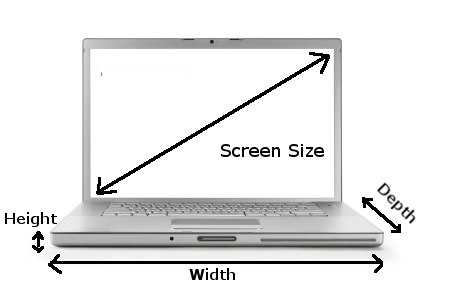 Measure the visible display area diagonally from corner to corner. Do not include the bezel, frame, lid, width, height or depth of the laptop.
1
Open the laptop
Place the laptop on a flat surface and make sure the screen is fully visible.
2
Measure the display area
Put the tape measure on one corner of the visible screen area, not the plastic bezel.
3
Read the diagonal size
Measure to the opposite corner. This diagonal measurement is the screen size.
Do not measure the bezel, frame or laptop lid
The screen size is not the same as the laptop size. A 15.6 inch screen does not mean the whole laptop is 15.6 inches wide. It means the visible display area measures approximately 15.6 inches diagonally.
If the LCD panel has already been removed from the laptop, do not include the thin metal frame or mounting tabs around the screen. Measure the active glass/display area only.
Quick rule
Measure only the part that lights up and shows the picture. Anything around that area — plastic, rubber, metal frame, bezel or lid — should not be included.
Why advertised laptop size can be misleading
Laptop manufacturers often round or market screen sizes differently. A laptop sold as a “14 inch laptop” may use a 14.0 inch, 14.2 inch, 14.4 inch or 14.5 inch screen. A “15 inch laptop” may use a 15.0 inch, 15.1 inch, 15.3 inch, 15.4 inch or 15.6 inch display.
This is why you should not order a replacement laptop screen based only on the advertised laptop size. Always check the exact laptop model number and, where possible, the LCD panel model number printed on the back of the original screen.
Example: 14 inch laptops
A “14 inch laptop” may not always use a 14.0 inch screen. Some modern models use 14.2 inch, 14.4 inch or 14.5 inch panels.
Example: 15 inch laptops
A “15 inch laptop” may use 15.0, 15.1, 15.3, 15.4 or 15.6 inch displays depending on the model.
Common laptop and tablet screen sizes
The table below includes older screen sizes still found in replacement screens, plus newer sizes used in modern laptops, tablets, convertibles and premium devices.
| Screen size |
Where commonly found |
Buying notes |
| 7.0 inch to 10.1 inch |
Tablets, older netbooks and small convertible devices |
Often model-specific. Tablet screens may include touch glass or a full display assembly. |
| 11.6 inch |
Chromebooks, education laptops and compact laptops |
Still common in budget, education and portable machines. |
| 12.0 inch to 12.5 inch |
Older ultraportables and compact business laptops |
Often model-specific, so the exact part number is important. |
| 13.1 inch |
Older Sony and specialist laptops |
Now uncommon and usually difficult to source. |
| 13.3 inch |
Ultrabooks, compact laptops and older MacBook models |
Still common, but now joined by 13.4, 13.5, 13.6 and 13.8 inch sizes. |
| 13.4 inch |
Premium thin-and-light laptops |
Often used in slim-bezel laptops with modern screen ratios. |
| 13.5 inch |
3:2 productivity laptops |
Common on laptops designed for office work, browsing, coding and documents. |
| 13.6 inch |
Modern ultraportable laptops |
Used on some newer slim laptops. Do not confuse it with 13.3 inch. |
| 13.8 inch |
Modern productivity laptops |
A newer size used by some premium Windows laptops. |
| 14.0 inch |
Business laptops, ultrabooks and everyday laptops |
One of the most common modern laptop screen sizes. |
| 14.1 inch |
Older business laptops |
An older standard mostly replaced by 14.0 inch screens. |
| 14.2 inch |
Modern 14 inch premium laptops |
Do not assume a 14.0 inch replacement will fit. |
| 14.4 inch to 14.5 inch |
Premium laptops, creator laptops and specialist models |
Less common than 14.0 inch, but increasingly used in higher-end machines. |
| 15.0 inch to 15.2 inch |
Older laptops and specialist models |
Older standards. Usually model-specific and not the same as 15.6 inch. |
| 15.3 inch |
Modern 15 inch slim laptops |
A newer size. Do not confuse it with 15.4 or 15.6 inch screens. |
| 15.4 inch |
Older widescreen laptops and older Apple models |
Once very common, but now mostly replaced by newer widescreen standards. |
| 15.6 inch |
Mainstream laptops, budget laptops, business laptops and gaming laptops |
Still one of the most common replacement laptop screen sizes. |
| 16.0 inch |
Modern creator laptops, gaming laptops and productivity laptops |
Now common on laptops using taller 16:10 displays. |
| 16.2 inch |
Modern 16 inch premium laptops |
Do not confuse it with 16.0 or 16.4 inch screens. |
| 16.4 inch |
Older Sony and specialist multimedia laptops |
Usually model-specific and often uses non-standard connections or fittings. |
| 17.0 inch to 17.1 inch |
Older large laptops |
Older standards that are now less common and often harder to source. |
| 17.3 inch |
Large laptops, gaming laptops and desktop replacement laptops |
Still common in larger performance laptops. |
| 18.0 inch |
Modern high-end gaming laptops |
A newer large-format size used in some current gaming machines. |
| 18.4 inch |
Older large gaming and specialist laptops |
Mostly older and specialist. Do not assume it is interchangeable with 18.0 inch panels. |
Screen size is only one part of compatibility
Once you know the screen size, you still need to check the rest of the specification. A 15.6 inch replacement screen, for example, may be available in several different versions that are not interchangeable.
Check these details before ordering
- Screen size, such as 13.3 inch, 14.0 inch, 15.6 inch or 17.3 inch
- Resolution, such as HD, Full HD, WUXGA, WQXGA, QHD, 3K or 4K
- Connector type, such as LVDS, 30-pin eDP or 40-pin eDP
- Connector pitch, such as 0.4mm or 0.5mm where relevant
- Connector position, such as bottom left, bottom right or centre
- Mounting style, brackets, tabs or adhesive/no-tabs design
- Touchscreen or non-touchscreen version
- Screen finish, such as matte anti-glare or glossy
- Panel technology, such as IPS, OLED, mini-LED or standard LCD
- Refresh rate, such as 60Hz, 90Hz, 120Hz, 144Hz or higher
- Brightness and colour gamut where important
- Original LCD panel model number where possible
Common measuring mistakes
Measuring the whole lid
The laptop lid is larger than the actual display panel. Only the visible screen area counts.
Including the bezel
The plastic or black border around the screen is not part of the screen size measurement.
Measuring left to right
Screen size is measured diagonally, not horizontally across the width.
Can I order by size alone?
No. Size is a useful starting point, but it is not enough to guarantee that a replacement laptop screen will fit or work correctly.
Two screens can both be 15.6 inch, but one might be HD and the other Full HD. One might have a 30-pin connector and another might have a 40-pin connector. One might have side brackets and another might use adhesive strips. Touchscreen models may require a completely different display assembly.
Buying warning
Always match the full screen specification or the original LCD panel model number where possible. Screen size alone is not enough.
How to find the correct replacement laptop screen
The best way to find the correct replacement is to search by your laptop model number or by the part number printed on the back of the original screen. The model number is usually printed on the base of the laptop, under the battery, on the original box or in the system information screen.
If the screen has already been removed, check the label on the rear of the LCD panel. This label usually contains the exact screen model or manufacturer part number, which is often the most reliable way to match a replacement.
Related guide:
How to identify your laptop screen model
Best rule: measure the screen, then match the original panel.
Measuring tells you the screen size, but the original LCD panel number helps confirm the exact resolution, connector, mounting style, finish, touch support and compatibility.
Frequently asked questions
Do I measure the screen or the whole laptop?
Measure only the visible display area of the screen. Do not measure the full laptop lid, outer casing or plastic border around the display.
Do I measure across or diagonally?
Measure diagonally from one corner of the visible display area to the opposite corner. Laptop and tablet screen sizes are sold by diagonal measurement.
Do I include the bezel when measuring a laptop screen?
No. Do not include the plastic bezel, black border, frame or lid. Measure only the part of the screen that displays the image.
Is a 14 inch laptop screen always 14.0 inches?
No. A laptop advertised as 14 inch may use a 14.0 inch, 14.2 inch, 14.4 inch or 14.5 inch display depending on the model.
Is a 15 inch laptop screen always 15.6 inches?
No. A 15 inch laptop may use several different screen sizes, including 15.0 inch, 15.1 inch, 15.3 inch, 15.4 inch or 15.6 inch.
Can I buy a replacement screen by size only?
No. Screen size is only one specification. You must also check resolution, connector type, connector position, mounting style, touch support, finish, refresh rate and the original LCD panel model where possible.
