Laptop Screen Buying Guide
Laptop Screen Connector Pitch Explained: 0.4mm vs 0.5mm eDP Connectors
Laptop screen connector pitch is one of the easiest specifications to miss when buying a replacement LCD panel. A screen can have the right size, resolution and number of pins, but still be wrong if the connector pitch does not match your laptop cable.
 Rear view of a laptop LCD panel. The small connector at the bottom is where the laptop display cable plugs into the screen.
0.4mm pitch
Smaller, narrower connector often used on newer slim panels
0.5mm pitch
Wider connector commonly found on many replacement laptop screens
30-pin / 40-pin
Pin count is not the same thing as connector pitch
Compatibility
The cable and screen connector must physically match
What does laptop screen connector pitch mean?
The connector pitch is the spacing between the pins inside the screen connector. On laptop LCD screens, the most common connector pitches are 0.4mm and 0.5mm.
This sounds like a tiny difference, but it matters. A 0.4mm connector is physically smaller and narrower than a 0.5mm connector. If the connector pitch is wrong, the laptop display cable will not fit correctly.
Simple explanation
The number of pins tells you how many contacts the connector has. The pitch tells you how close together those contacts are. You need both details to be correct.
0.4mm vs 0.5mm connector pitch in photos
The difference between 0.4mm and 0.5mm pitch is small, but it is enough to stop the laptop screen cable fitting correctly. The photos below show how connector width changes even when the pin count looks similar.
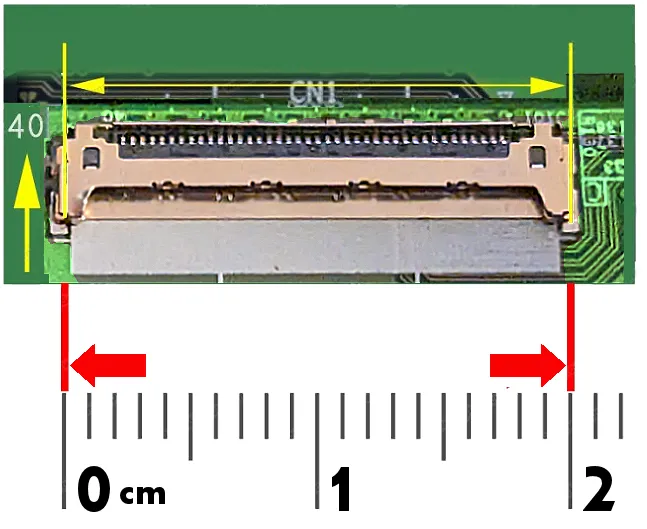 40-pin 0.4mm pitch connector
This is the smaller and narrower 40-pin connector. It is commonly found on newer slim panels, higher-resolution screens and some high refresh-rate laptop displays.
40-pin 0.4mm pitch connector
This is the smaller and narrower 40-pin connector. It is commonly found on newer slim panels, higher-resolution screens and some high refresh-rate laptop displays.
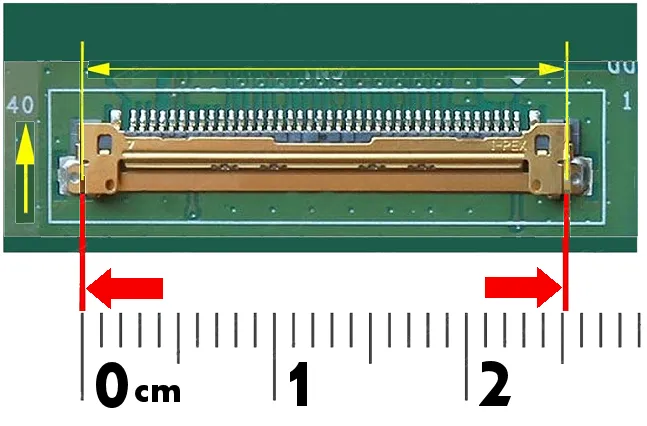 40-pin 0.5mm pitch connector
This is the wider 40-pin connector. It may still be described as 40-pin, but it is not physically the same as a 40-pin 0.4mm connector.
40-pin 0.5mm pitch connector
This is the wider 40-pin connector. It may still be described as 40-pin, but it is not physically the same as a 40-pin 0.4mm connector.
 30-pin 0.5mm pitch connector
A common 30-pin laptop screen connector. Always check both the pin count and the pitch before ordering a replacement LCD panel.
30-pin 0.5mm pitch connector
A common 30-pin laptop screen connector. Always check both the pin count and the pitch before ordering a replacement LCD panel.
Important
Do not buy by pin count alone. A screen listed as 30-pin or 40-pin can still be wrong if the connector pitch, connector position, resolution, mounting style or screen type does not match your original panel.
0.4mm vs 0.5mm laptop screen connectors
A common mistake is to search only for “30-pin laptop screen” or “40-pin laptop screen”. That is not always enough. A 40-pin 0.4mm connector and a 40-pin 0.5mm connector are not the same physical connector.
| Connector pitch |
Also described as |
Common use |
Buying warning |
| 0.4mm pitch |
Small pitch, narrow pitch, slim connector |
Often used on newer, thinner laptop panels and some higher-spec eDP screens. |
Do not assume it will fit a wider 0.5mm cable, even if the pin count is the same. |
| 0.5mm pitch |
Large pitch, wide pitch, standard pitch |
Common on many laptop LCD panels and older screen designs. |
Physically wider than 0.4mm. A 0.5mm cable will not correctly fit a 0.4mm connector. |
Is 40-pin always the same?
No. This is the most important point for customers ordering a replacement screen.
A product listing may say 40-pin eDP, but that does not automatically tell you the connector pitch. Some 40-pin connectors are 0.4mm and others are 0.5mm. They can look similar in photos, but they are not interchangeable.
The same issue can apply to 30-pin screens. Always check the full connector description, not just the number of pins.
Common laptop screen connector combinations
These are examples of connector descriptions you may see when buying laptop screens. The exact part you need depends on the original screen and laptop cable.
| Connector type |
What it means |
Typical notes |
| 30-pin eDP 0.5mm |
30 contacts with wider 0.5mm spacing |
Common on many standard laptop LCD panels. |
| 40-pin eDP 0.4mm |
40 contacts with small 0.4mm spacing |
Often seen on newer panels, high-resolution screens, touch screens or high refresh rate panels. |
| 40-pin eDP 0.5mm |
40 contacts with wider 0.5mm spacing |
Used on many laptop panels, but not interchangeable with 0.4mm versions. |
| LVDS connectors |
Older laptop screen connector technology |
Usually found on older laptops. Do not mix LVDS and eDP screens. |
Why connector pitch matters when buying a replacement screen
Laptop screens are not chosen by size alone. A 15.6-inch Full HD screen may look right, but the connector can still be wrong. The display cable inside the laptop has to plug securely into the screen.
If the pitch is wrong, the cable may not fit, may sit loose, or may risk damage if forced. This is why connector pitch appears in product specifications when it is important for that screen type.
Pin count
This tells you how many contacts are in the connector, such as 30-pin or 40-pin.
Connector pitch
This tells you the spacing between those contacts, such as 0.4mm or 0.5mm.
How to check which connector pitch you need
The safest method is to remove the original screen and check the exact LCD panel model number printed on the back. That model number can then be matched to the correct screen specification.
If you cannot remove the screen, use the laptop model carefully and check the full product specification. Some laptop models were sold with more than one screen type, so the exact original panel is still the best reference.
Check these details before ordering
- Screen size, such as 13.3 inch, 14.0 inch, 15.6 inch, 16.0 inch or 17.3 inch
- Resolution, such as HD, Full HD, WUXGA, WQXGA, QHD or 4K
- Connector type, such as eDP or LVDS
- Pin count, such as 30-pin or 40-pin
- Connector pitch, such as 0.4mm or 0.5mm
- Connector position, such as bottom right or bottom left
- Mounting style, brackets, tabs or adhesive/no-tabs design
- Touch or non-touch version
- Refresh rate, such as 60Hz, 90Hz, 120Hz, 144Hz or higher
- Original LCD panel model number where possible
Common connector pitch mistakes
Only checking “30-pin” or “40-pin”
Pin count is important, but it does not tell you the connector pitch. A 40-pin 0.4mm screen is not the same as a 40-pin 0.5mm screen.
Ignoring connector position
Even if the connector type is correct, the cable may not reach if the connector is on the wrong side of the panel.
Assuming every screen in a laptop model is the same
Some laptops were sold with different screen options. The safest match is the original LCD panel model number.
Can I use an adapter for a different connector pitch?
Adapters and converter cables exist for some screen types, but they are not the normal solution for most customers. They may not fit inside the laptop lid, may not support the required signal, or may create reliability problems.
For a normal laptop screen replacement, the best advice is simple: buy the screen with the correct connector pitch for your original laptop cable.
Our advice
When choosing a replacement laptop screen, do not rely on size and pin count alone. Connector pitch is a small measurement, but it can decide whether the screen physically connects to your laptop.
If the product specification says Connector Pitch: 0.4mm or Connector Pitch: 0.5mm, check that it matches your original screen or cable before ordering.
Best rule: match the original screen model number wherever possible.
The original LCD panel code is usually the most reliable way to confirm screen size, resolution, connector type, connector pitch, connector position and mounting style.
Frequently asked questions
What is laptop screen connector pitch?
Connector pitch is the spacing between the pins in the screen connector. On laptop screens, the common pitches are 0.4mm and 0.5mm.
Is 0.4mm pitch the same as 0.5mm pitch?
No. A 0.4mm connector is narrower than a 0.5mm connector. The laptop cable and screen connector must match.
Is every 40-pin laptop screen connector the same?
No. A screen can be 40-pin 0.4mm or 40-pin 0.5mm. Pin count and pitch are different specifications.
Can I force a laptop screen cable into the wrong connector?
No. Forcing the wrong cable into a connector can damage the cable, the screen connector or the laptop. If it does not fit naturally, stop and check the specification.
How do I know if I need 0.4mm or 0.5mm?
Check the original LCD panel model number or the product specification for your exact screen. If connector pitch is listed, match it carefully.
