 If you work with laptop, AIO, or monitor LCD replacements long enough, you’ll eventually run into one of the biggest headaches in the industry:
👉 The same LCD part number… but completely different physical screens.
One of the worst offenders we’ve dealt with recently is the BOE HYDIS MV270QUM-N20.
At first glance, everything looks normal:
- Same manufacturer (BOE / HYDIS)
- Same size and resolution
- Same printed part number on the label
- No visible revision, hardware number, or warning
But in reality, there are THREE physically different versions of this panel, and fitting the wrong one can mean:
- Wrong connector position
- Wrong pin orientation
- Cable won’t reach
- Screen simply won’t power on
After extensive hands-on testing, returns analysis, and real-world installs, we’ve confirmed three distinct MV270QUM-N20 variants.
This article explains exactly how to identify them and which systems they are used in.
❗ Why This Happens (And Why It’s Not Your Fault)
Manufacturers often reuse the same base LCD model across:
- Laptops
- All-in-One PCs
- External monitors
Instead of issuing a new public part number, they:
Change the connector position
Modify the signal routing
Assign OEM-specific internal part codes (FRU / HP P/N etc.)
Unfortunately, the sticker still says only “MV270QUM-N20”, making it impossible to identify the correct panel unless you know what to look for.
✅ The 3 Confirmed MV270QUM-N20 Variants
🔹 TYPE 1 – Lenovo Laptop Version (FRU SD10W87266)
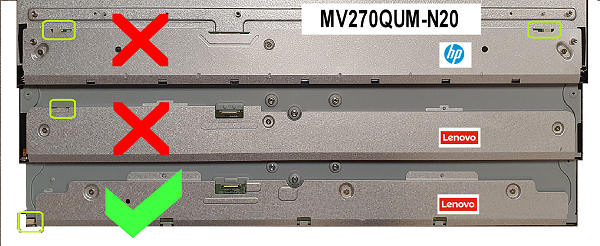
Used in:
✔ Lenovo laptops
✔ Lenovo OEM systems with FRU SD10W87266
How to identify it:
- Connector position matches Lenovo laptop cable routing
- Designed for laptop hinge & cable layout
- Will NOT fit AIOs or monitor housings correctly
Important:
This version is only correct if your original screen or parts list references SD10W87266.
🔹 TYPE 2 – HP Monitor / HP All-in-One Version
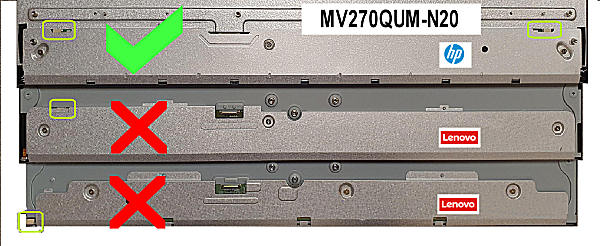
Used in:
✔ HP monitors
✔ HP All-in-One (AIO) systems
This is the variant that causes the most confusion, because HP does not clearly label it as a different MV270QUM-N20.
Key characteristics:
- Different connector placement compared to Lenovo laptop versions
- Cable entry designed for monitor/AIO chassis, not laptop lids
- Often found in factory-built HP displays
Important note:
Even though it still says MV270QUM-N20, this screen is not compatible with Lenovo laptop or Lenovo AIO variants.
If your screen came from an HP AIO or monitor, this is likely the correct type.
🔹 TYPE 3 – Lenovo AIO / Desktop Version (Multiple Lenovo Part Numbers)
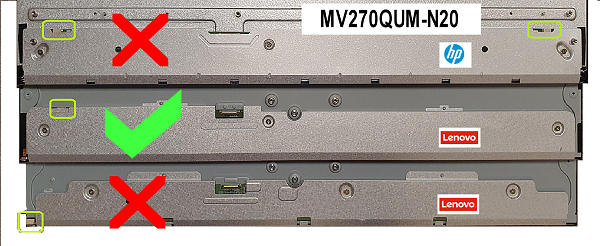
Used in:
✔ Lenovo All-in-One systems
✔ Lenovo desktops with the following part numbers:
- 5D10W33965
- 5D10W33968
- 5D10W33964
- 5D10W33969
- MV270QUM-N20-REV.B5
How this one differs:
- Connector position is unique to Lenovo AIO chassis
- Cable routing differs from both laptop and HP versions
- Often mis-sold as a “standard” MV270QUM-N20
If your original screen or service manual lists any of the part numbers above, you must use this variant.
🚨 Why Ordering “MV270QUM-N20” Alone Is Not Enough
Because all three panels are labelled identically, ordering by part number alone is risky.
Before replacing this screen, you should always check:
- Original screen connector position
- System type (Laptop, AIO, or Monitor)
- OEM part numbers or FRU codes
- Cable reach and routing
If even one of these doesn’t match, the screen may:
- Not connect
- Not display
- Be physically impossible to install
🛠 Our Advice (From Painful Experience)
This is not a theoretical issue — it’s something we’ve dealt with repeatedly.
If you’re unsure:
- Compare your original screen to the connector images
- Check Lenovo FRU or HP part numbers
At Laptop-LCD-Screen.co.uk, we stock UK-held panels, offer next-day AM delivery, fast EU shipping, and back everything with a huge 2-year warranty — but more importantly, we make sure you get the correct physical screen, not just a matching label.
