




Cart
£0.00
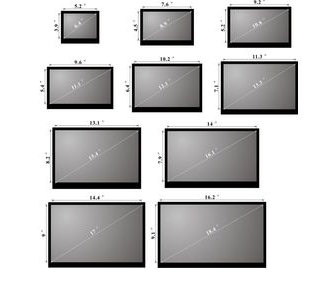
If you've been watching IT trends recently you will have noticed that there is a rapidly growing rise in the demand for retail replacement laptop screens. Advancements in Internet technology have allowed sites like YouTube and Blogger to provide interactive DIY laptop screen repair tutorials, and these have enabled millions of individuals to undertake their own laptop screen repair. Because of this sharp rise in demand for replacement laptop screens prompted by video tutorials such as this one, appearing on YouTube around 2008, there has been an equal rise in the amount of laptop screen suppliers emerging on the market to fulfil this new demand. If you are interested in reselling laptop screens, you'll need to find a reputable wholesale screen supplier, but before you contact them there are a few things you will need to consider.
Before you can consider selling laptop screens to end users, you must understand some fundamental basics with regard to how the industry operates. This information is extremely important as you can very easily lose money if the correct screens are not purchased. Many screen suppliers without sufficient knowledge send out screens that do not work; because of the reasons we've listed below, later only having to restock and refund the sale, time and time again.
All laptop screens are compatible screens. There's no such thing as a genuine replacement. Read this blog article which explains why. Now you understand how the industry operates, you can proceed to gather the further information you require to get started.
It's not enough information to know the size, type and resolution of screen you require.
Although size and type is a great start, there are many other factors that can determine whether a screen will be compatible with a particular model of laptop or not. For example there is no such thing as a standard 13.3" WXGA LED laptop screen. There is no such thing as a standard 14.0" WXGA LED laptop screen. Laptop screen suppliers use many different models of screens with the same physical specifications, such as 14.0"size, WXGA type and LED backlight, however to purchase you will need further information, we've detailed this below, read on.
Ideally you will need to approach a laptop screen supplier with LCD model numbers.
This of course is not always possible, and any reputable supplier will try and help you as much as possible, but you'll need to give them some idea of the types of laptops you're looking to sell the replacement panels for. We've given some popular examples below. Keep on reading!
The same size and type of screen can come with connector positions in various places, you need to be aware of this before you ask for a quotation for a "Standard" 10" or a "Standard" 14" screen. This blog article explains laptop screen connector positions.
Screens come in the same specifications and sizes but with various types of connector, 20 Pin, 30 Pin and 40 Pin are common. In addition to the connector pin sizes, there are other factors such as the style of connector. Not all 40 Pin connectors are the same size! Some DELL machines for example come with locking connectors, some Toshiba laptops have larger ToshCon inverter plugs, however there are some types of connector such as the 30 and 40 PIN standard found on LED and CCFL screens that are pretty standard for many models of laptop such as HP, Acer and Packard Bell. Some 13.3" laptops can come with a standard screen but with a 20 pin or 30 pin connector, even in the same laptop model - the rest of the screen is the same so without physically inspecting the old screen there is no way to tell which of the two types to supply your client. Of course if you purchase the wrong connector size, or the wrong connector style for a particular laptop model, it won't fit and you'll be refunding the client and their postage, and restocking your screen.
Laptop screens also have software loaded onto them called EDID or firmware. The same screen can be programmed for various uses in different machines using EDID programming equipment known as an LCD burner. The EDID holds an operating system with configuration data such as resolution and picture rotation. Different versions of the same screen model may indicate different versions of the EDID for different laptop manufacturers. Get a screen with the wrong EDID and even though the specifications are right for the laptop, it won't work.
Other types of laptop screen may have mountings or fixings in different positions, the screw holes could be in the wrong place if you supply a screen that you think will fit a particular laptop type but doesn't. For example. LP140WH2, this model of screen comes in various styles with different screw hole positions. For this reason the screen model in some instances is not enough information and further version and hardware details are required. Often screens will have a HW (hardware) version as well as a software (EDID) version.
Older laptop screens come with a CCFL inverter powered backlight. This type of screen is powered by a power inverter. If the inverter does not output the correct voltage for the CCFL lamp inside the screen, you can burn the screen backlight or inverter out over a short period of time. For this reason, certain models of laptop require a particular model only of replacement laptop screen. Newer LED backlit screens can cause more damage if the wrong type is fitted to certain models. LED screens that are not compatible can burn out the connector on the motherboard of the laptop being repaired; rendering the laptop unusable again. This blog article explains the difference between LED and CCFL screens.
Laptop screens are on a diet! Some models of laptops are now being fitted with razor or slim screens. This obviously throws a spanner in the works for supplying a screen for a model that has had both standard and slim screens fitted during the course of it's production. The Acer Aspire 5742 is a classic model that comes with a standard 15.6" LED 40 Pin screen and also a razor slim screen model. Acer have re used the same model number 5742, so without inspecting the screen inside the machine you can't tell which one to supply.
- Screens come in different finishes, typically the more popular Gloss finish, however some screens are only available in MATTE. Sometimes there is a choice. This blog article explains the difference between MATTE and Gloss screens.
- Inverter cable length. CCFL inverter powered screens can come with the lamp power cable (inverter cable) in different lengths. This isn't often a problem, but you need to be aware that in some circumstances you'll need to send a screen with a longer CCFL power lead. Some screen suppliers stock extension leads that can be sold separately in these instances.
You'll need to do a little research and find the model numbers of the screens you require, or submit a request to a wholesale screen supplier for the top ten selling laptop screen panel models. You should already have an idea of the following before you begin to think about speaking to a supplier.
- What size screens do I require?
- What resolution of screen do I require?
- What backlight type do I require?
- What is the connector position?
- Is the screen standard or slim (razor)?
And - Or
- Which kind of laptops do I wish to fit these in? e.g. IBM, DELL, HP, ACER, SONY, FUJITSU
If you can approach a supplier with at least this information they should be able to provide you with a quotation for screens that will work in 90% of cases. Again it is always best if possible to order by screen model number. This 10% risk factor when sending a replacement screen is the reason why many people choose not to supply replacement laptop screens. It's a complicated business that requires expertise and experience. Again, however, a decent supplier will be able to help put you in the right direction and get started with the basic models.
Roll up your sleeves, prepare to work hard, prepare to be methodical. You'll need to learn by trial and error which screens are right for which laptops. You'll need access to photographs of LCD panels and their datasheets so that you can determine a compatible screen in stock to send as a correct replacement for the laptop's original screen. Remember the original screen is often not available anymore. Any decent wholesale laptop screen supplier will be able to help you to a certain extent with all this. What they won't do however, is hand over their compatibility databases or provide datasheets for particular screens; however, you can expect a decent supplier to at least help you start by stocking the 10 best sellers and give you some ideas of the types of laptops these screens will be fitted to. There are 2 types of 10.1" screen and 2 types of 15.6" screen that are very popular and of course you probably already know the 15.4" Standard screens that are in many laptops and the 17.1" screens fitted to many models as well. You can stock most of these with confidence for 90% of the laptops on the market.
| Screen manufacturer | Model starts with | Example | ||
| AUO / AU Optronics | A, B or G | B156XW02 V.1 | ||
| BoeHydis / Hyundai BOE | HV or HT | HT140WXB-501 | ||
| Chi Mei | N | N17306 L02 | ||
| Chunghwa | CLAA | CLAA140WB01A | ||
| Hannstar | HSD | HSD100IFW1 A00 | ||
| Hitachi | TX |
|
||
| ID Tech | IT or IA | ITXG77C | ||
| Innolux | BT | BT140GW02 V.9 | ||
| IVO | MT | M101NWT2 R2 | ||
| LG Philips / LG Display | LP | LP101WSA TL A1 | ||
| Quanta | QD | QD15TL07 | ||
| Samsung | LT or LTN | LTN156AT02 | ||
| Sharp | LQ or LM | LQ164M1LA4A | ||
| Toppoly | TD | TD141TGCK1 | ||
| Toshiba Matsushita | LTD | LTD133EXBY |
The LCD screen model number will usually be on the back of the screen, sometimes hidden behind a foil covering which may need to be peeled off first.
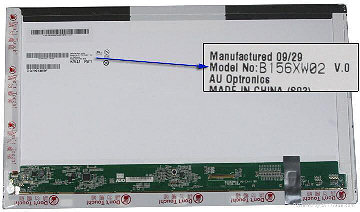
Your best place to start is a Google search.
You may also wish to view this blog article entitled Laptop Screen Suppliers - How do you choose a reputable LCD supplier?
Information about upgrading screens inside laptops Upgrading Your Laptop Screen Resolution
What is laptop screen resolution? This blog explains Laptop Screen Resolution
Backlighting technology - What does CCFL and LED mean?
Laptop Screen Troubleshooter - Diagnose problems with your clients laptop displays.

