Laptop Screen Technology Guide
WLED vs Mini-LED vs OLED Laptop Screens: What’s the Difference?
WLED, Mini-LED and OLED are three important display technologies used in modern laptops. They affect brightness, black levels, contrast, colour, battery behaviour, repair cost and replacement compatibility. This guide compares the three clearly, without confusing it with our separate OLED buyer’s guide.
WLED
LCD panel with a standard white LED backlight
Mini-LED
LCD panel with many tiny local-dimming LEDs
OLED
No backlight — each pixel lights itself
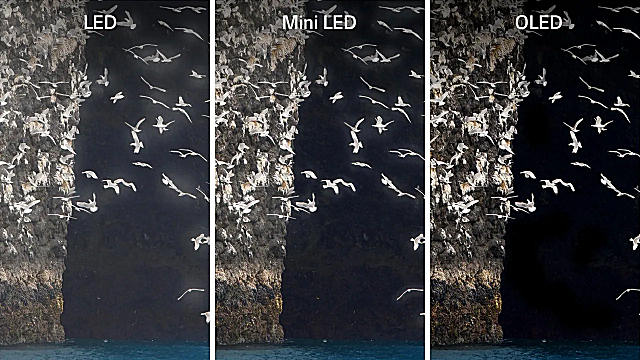 WLED, Mini-LED and OLED can all be excellent laptop screen technologies, but they work in very different ways.
The simple difference
The easiest way to understand the difference is to separate LCD screen technology from backlight technology.
WLED and Mini-LED are both LCD-based technologies. The image is created by an LCD panel, and light comes from a backlight behind it. OLED is different because it does not use a separate backlight. Each OLED pixel produces its own light.
Plain English
WLED and Mini-LED are backlit LCD screens. OLED is self-lighting, with each pixel able to turn on or off individually.
How the three display types create light
WLED
Standard LCD panel with a white LED backlight behind it.
Mini-LED
LCD panel with many tiny backlight LEDs and local dimming zones.
OLED
No separate backlight. Each pixel creates its own light.
What is WLED?
WLED stands for White Light Emitting Diode. In laptop screen listings, WLED usually means an LCD panel that uses white LEDs as its backlight.
WLED is the most common laptop screen backlight type. It is widely available, cost-effective, reliable and used across many HD, Full HD, WUXGA, QHD and 4K laptop displays.
Best for
Everyday laptop repairs, business machines, school laptops, budget replacements and widely available parts.
Main strength
Affordable, common and generally straightforward to source and replace.
Main limitation
Black levels and contrast are usually weaker than Mini-LED or OLED.
What is Mini-LED?
Mini-LED is still an LCD technology, but it uses many more, much smaller LEDs behind the LCD panel. These LEDs can be grouped into local dimming zones, allowing better brightness control than ordinary WLED backlighting.
Mini-LED can produce stronger contrast, brighter highlights and better HDR performance than standard WLED. It can get closer to OLED in some situations, while avoiding OLED burn-in risk.
Best for
Premium laptops, HDR content, creative work, gaming laptops and users who want high brightness.
Main strength
Very bright image, strong HDR performance and better contrast than ordinary WLED.
Main limitation
Still uses an LCD layer, so black levels are not the same as OLED and blooming can occur around bright objects.
What is OLED?
OLED stands for Organic Light Emitting Diode. Unlike WLED and Mini-LED, OLED does not need a separate backlight. Each pixel emits its own light and can switch off completely.
This gives OLED excellent black levels, very high contrast and rich colour. However, OLED replacement screens can be more expensive, more delicate and must be matched very carefully to the original laptop.
Best for
Premium ultrabooks, media laptops, creative laptops and users who want deep blacks and rich contrast.
Main strength
True black levels, high contrast and excellent image quality.
Main limitation
Higher cost, potential burn-in risk and stricter replacement compatibility.
WLED vs Mini-LED vs OLED comparison table
The table below compares the three technologies from a laptop repair and replacement point of view.
| Feature |
WLED |
Mini-LED |
OLED |
| Basic type |
LCD with white LED backlight |
LCD with many small local-dimming LEDs |
Self-emissive pixels with no separate backlight |
| Backlight required? |
Yes |
Yes, with advanced dimming zones |
No |
| Black levels |
Usually greyish compared with OLED |
Much better than standard WLED, but not perfect |
True black because pixels can switch off |
| Brightness |
Good enough for most everyday laptops |
Often very strong, especially for HDR |
Excellent contrast, but full-screen brightness varies by panel |
| Contrast |
Moderate |
High |
Excellent |
| Burn-in risk |
No OLED-style burn-in risk |
No OLED-style burn-in risk |
Possible with heavy static content over time |
| Availability |
Very common |
Less common, usually premium laptops |
Growing, usually premium laptops |
| Replacement cost |
Usually lowest |
Usually higher than WLED |
Usually higher and more model-specific |
| Repair difficulty |
Often straightforward if the specification matches |
More specialist; match the exact model carefully |
More specialist; match the exact OLED assembly/panel carefully |
| Best use |
General replacement, office, school and budget repairs |
HDR, high brightness, gaming and creator laptops |
Premium image quality, deep blacks and media work |
Do not assume WLED, Mini-LED and OLED are interchangeable
WLED, Mini-LED and OLED panels are not simply three versions of the same part. They can use different power requirements, display cables, panel electronics, firmware expectations, lid assemblies, touch layers and mounting designs.
A laptop originally designed for an OLED screen may not accept a WLED screen, and a laptop designed for a WLED screen may not support an OLED or Mini-LED upgrade. Even when the size and resolution look similar, the screen may still be incompatible.
Buying warning
Match the original display type wherever possible. Do not replace OLED with WLED, WLED with OLED, or WLED with Mini-LED unless that exact upgrade is known to be compatible with the laptop model, cable and firmware.
Which screen technology should you choose?
The best display technology depends on the laptop, the original screen, the customer’s use and the budget. For a replacement screen, compatibility comes first. Image quality comes second.
Quick buying advice
- Choose WLED for affordable everyday repairs.
- Choose Mini-LED where high brightness and HDR matter.
- Choose OLED where deep blacks and premium image quality matter.
- Choose WLED for school, office and general business machines.
- Choose Mini-LED for high-end gaming and creator laptops where originally fitted.
- Choose OLED for media, design and premium ultrabooks where originally fitted.
- Avoid OLED for heavy static-screen use unless burn-in care is understood.
- Never choose by display technology alone; match the full specification.
WLED: practical replacement advice
WLED laptop screens are usually the easiest to source and the most cost-effective to replace. Most standard laptop replacement panels are WLED-backlit LCD screens.
When ordering a WLED replacement, check the usual compatibility details: screen size, resolution, connector type, connector position, mounting style, finish, panel type and refresh rate.
Mini-LED: practical replacement advice
Mini-LED laptop screens are more specialised. They are often found in premium systems where brightness, HDR and contrast are major selling points.
If your laptop originally used Mini-LED, replace it with the correct Mini-LED part or a confirmed compatible equivalent. Do not assume a standard WLED screen will behave the same way, even if the physical size and resolution appear to match.
OLED: practical replacement advice
OLED laptop screens should be matched especially carefully. OLED panels do not use the same backlight structure as WLED or Mini-LED screens, and they may have different power, signalling, cable and assembly requirements.
If your laptop came with an OLED display, the safest replacement is normally the correct OLED screen or full OLED assembly specified for that exact model.
Brightness, black levels and burn-in
Display technology affects how a laptop screen behaves in real use. The most noticeable differences are usually black levels, contrast, brightness and long-term behaviour with static content.
Black levels
OLED is strongest because pixels can switch off. Mini-LED is much better than ordinary WLED, but it still uses a backlight. WLED usually has the weakest blacks of the three.
Brightness
Mini-LED can be very bright, especially for HDR. WLED is usually good enough for everyday use. OLED looks excellent, but brightness behaviour depends on panel design and content.
Burn-in
WLED and Mini-LED do not have OLED-style burn-in risk. OLED can suffer image retention or burn-in if static images are displayed heavily over long periods.
Repair cost
WLED is usually cheaper and easier to replace. Mini-LED and OLED are normally more expensive and more model-specific.
Can I upgrade from WLED to Mini-LED or OLED?
Usually, the answer is no unless that upgrade is specifically supported by the laptop model. Upgrading from WLED to Mini-LED or OLED is not like choosing a brighter bulb. The screen technology can require different electronics, cable support, firmware and physical assembly.
Some laptop ranges are sold with several display options, but that does not mean every display option is interchangeable. A different screen type may also require a different display cable or lid assembly.
Upgrade rule
Treat WLED, Mini-LED and OLED upgrades as model-specific. Confirm the exact panel, cable and laptop compatibility before ordering.
What to check before buying a replacement screen
Display technology is only one part of compatibility. A replacement screen can be WLED, Mini-LED or OLED and still be wrong if another key specification does not match.
| Check |
Why it matters |
| Original screen model |
The safest way to match a replacement is often the original LCD/OLED panel model number. |
| Display technology |
WLED, Mini-LED and OLED are not automatically interchangeable. |
| Screen size |
The replacement must physically fit the laptop lid and bezel. |
| Resolution |
The laptop, cable and panel must support the replacement resolution. |
| Connector type |
The screen cable must match the panel connector. |
| Connector position |
The cable must reach the connector without strain. |
| Mounting style |
Tabs, brackets, screw holes, adhesive strips or full assemblies may differ. |
| Touch support |
Touch and non-touch versions may use completely different assemblies. |
| Refresh rate |
High-refresh panels may require cable, motherboard and firmware support. |
Colour Gamut
|
Premium display features should be clearly listed if required. |
Related guides
For more detail on OLED specifically, use our OLED buying guide. For replacement matching, use the screen model and connector guides.
Summary: which one is best?
There is no single best display technology for every laptop repair. WLED is affordable and widely available. Mini-LED gives stronger brightness and contrast while staying LCD-based. OLED gives the deepest blacks and premium image quality but has stricter compatibility and burn-in considerations.
Best rule: match the original display technology first.
When replacing a laptop screen, choose the correct screen for the laptop before chasing display technology upgrades. WLED, Mini-LED and OLED screens can look similar in product photos, but they are not automatically compatible with the same laptop.
Frequently asked questions
What is the difference between WLED and OLED?
WLED is an LCD screen with a white LED backlight. OLED does not use a separate backlight because each pixel produces its own light.
Is Mini-LED the same as OLED?
No. Mini-LED is still an LCD screen with a more advanced LED backlight. OLED is self-emissive and does not use a separate backlight.
Is Mini-LED better than WLED?
Mini-LED is usually better for contrast, brightness control and HDR, but it is also less common and usually more expensive than ordinary WLED.
Is OLED better than Mini-LED?
OLED usually has better black levels and contrast because each pixel can switch off. Mini-LED can be brighter and avoids OLED-style burn-in risk.
Can I replace a WLED laptop screen with OLED?
Usually not unless that exact upgrade is confirmed for the laptop model. OLED may require different cables, electronics, firmware or assemblies.
Can I replace an OLED laptop screen with WLED?
Normally no. OLED and WLED panels work differently and may not use the same cable, power behaviour, firmware or physical assembly.
Does OLED have a backlight?
No. OLED pixels emit their own light, so there is no separate WLED or Mini-LED backlight layer.
Does Mini-LED have burn-in?
Mini-LED does not have OLED-style burn-in because it is an LCD technology with an LED backlight. It can still have other LCD-related limitations such as blooming.
Which display type is cheapest to replace?
WLED laptop screens are usually the most affordable and widely available. Mini-LED and OLED screens are normally more expensive and more model-specific.
What should I check before buying a replacement laptop screen?
Check the original panel model, display technology, screen size, resolution, connector type, connector position, mounting style, touch support, refresh rate, brightness and colour gamut.
