I need some help with:
An Ordering Enquiry
Delivery
Warranty
A Product Enquiry
Technical Question
Returns
Company / Reviews
It's important the laptop is completey off whilst you work on it.1. Remove the power cable. If you can.
2. Disconnect or remove the battery. If you cannot do this you must make sure the laptop does not power on during the installation.
Here is a
generic video that shows you how to remove a screen. You may find a more specific one, for your laptop (or tablet), on YouTube. Just search YouTube for '[
your laptop brand an model] screen replacement'.
Here is some help for you, in identifying the screen model number (part code), once you have removed the screen.
This blog article explains everything you need to know about the screen connector. Basically, the screen you buy has to have the same connector size, (number of pins) and connector positon (left, middle, right) as your original screen.
People always argue with us about this point, but
screen connector position is taken from the BACK of the display - not the front! This means if you are looking at the front of the screen, and the cable from under the keyboard comes up the left hand side of the screen, this is a right connector screen. You need to remove the screen to see the connector from the back.
This article explains resolutions. Essentially, you *may* be able to upgrade resolution, if you find a higher spec screen with the same connector pin count, and position as the original. It's hit and miss, however, as it depends on the cable the manufacturer fitted. We don't supply cables, nor can we tell you if your cable will allow an upgrade. Everything we know about upgrading, is in
this blog article here.
If you want to be sure that you will not have to return the product, don't try to upgrade!
Screens are measured diagonally, across the visible display area only. The measurement should not include any frame around the display, metal or plastic. Many people get this wrong, even when we explain it.
This blog article is very helpful in explaining it better, with visual assistance.
TN panels and IPS panels are completely interchangeable. Unfortunately, however, there are very few 1366x768(HD) IPS screens. This means that to upgrade an HD screen to IPS, you'd also need to upgrade the screen resolution to 1920x1080(FULL HD/FHD) or better. This is where problems can arise, and we talk about that in more detail
here.
Upgrading a screen from TN to IPS, without changing the resolution, is a straightforward swap out.
You can read more information about what an IPS screen is in
this blog article.
This article explains resolutions. Essentially, you *may* be able to upgrade resolution, if you find a higher spec screen with the same connector pin count, and position as the original. It's hit and miss, however, as it depends on the cable the manufacturer fitted. We don't supply cables, nor can we tell you if your cable will allow an upgrade. Everything we know about upgrading, is in
this blog article here.
If you want to be sure that you will not have to return the product, don't try to upgrade!
There are two parts to a touch screen, the screen itself and the touch glass (digitizer). You need both. A normal non-touch laptop screen would have a plastic bezel, or frame that you pull off and replace, once the new screen is fitted. Your touch screen model is likely missing that plastic frame, and so using a normal screen, would expose the insides of the lid. Webcam gubbins, cables and wifi antennaes would be exposed.
We explain this in more detail, in another article below, called 'I have a touch screen, I am confused!'
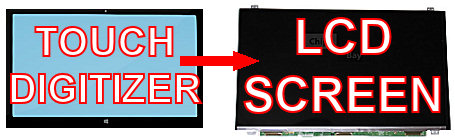
The LCD screen is the part you look at, the digitizer is the part you touch.
Two glass parts to a touch screen laptop.
Normal laptops (non-touch), have an LCD screen display, and a plastic frame around the screen which fits over the display once fitted. That plastic frame is called a bezel. Many touch screen laptops (but not the newer ones, thank god!), have a glass front glued to the LCD screen itself that replaces that plastic bezel. The glass front usually has a black border around it which simulates the bezel. The glass front part is the bit you touch. As you run your finger across it, sensors in the glass cover (over the screen itself), detect finger movements. The touch glass is known in the trade as a
digitizer. These glass front parts are notoriously difficult to find. If we say (no touch glass), or no digitizer in the product description, it means we don't have the glass front digitizer part.
Usually we will say this in the product title and description on our site as well. Because these digitizer parts are near impossible to find, or restricted from sale (by companies like HP and Toshiba for example), we can only supply the LCD screen part itself. If your old digitizer (touch glass) is not broken, it can be removed from the old LCD screen and fitted to the new screen. Most often however it is glued to the old screen. Even if it is glued, it can still be removed using a heat gun, however it's a tricky process.
Here is a video showing you how to remove the touch glass from the LCD screen on a mobile phone, using a heat gun. The principle is the same for laptop screens and tablet screens as well. Because this is a long-winded and delicate process
we recommend people avoid touch screen laptops altogether.
The good news is, some newer models of laptop are coming with touch screens that have the touch facility build into the screen, and use a classic plastic bezel instead of the glass front cover. This makes replacement simple, and we cover some of these newer machines in the comments section of
this blog article.
If you order a screen from us without the touch glass digitizer, it's no problem to return it, if you find you cannot use it. Just request a return authorisation for an unwanted product
here.
Where to go next?You can try
EET Group for most parts for all brands.
For HP, you can try
HP PartSurfer directly.
For Lenovo, you can try directly at
Lenovo FRU Parts or search for
Lenovo spare parts as many sellers have these.
For Toshiba, you can try
IPC-Computer Toshiba Parts.
For ASUS, you can try
AsusParts.eu or
ASUS Accessories.
EET Group has the largest selection of parts for various brands and is good for brands like Acer, Samsung, Clevo, and others.
Please note, these companies are not affiliated with us, so you will need to do your own research into their service, look at reviews and contact them before you make a decision to buy.
If you are having problems, you probably do. You can use our online
troubleshooter, to determine if you need a new screen, or your problem maybe elsewhere.
If you are still unsure, you can just buy a screen from us and try it. We will accept it back within 60 days for a full refund, even if you tried it, so long as it's still in brand new condition and you did not damage or mark it in any way.
If you live in the EU, we're flexible with the return timescale.
Usually people just try replacing the screen, as its still cheaper than a diagnosis in a repair shop.
This will be on the base of the machine. It's usually on a sticker, and is labelled 'model'. Sometimes the sticker is under the battery.
The receipt for your computer is also a great way to find the model number. You could also try contacting the store, where you purchased your computer.
Looking through our
categories of computer models, is a great way to familiarise yourself with model numbers, and what they look like.
If you are still stuck, the best thing to do is remove the damaged screen, and search our website for the screen model number. We have a
generic video you can watch that shows you how to remove your screen, although you may find a more specfic video, on YouTube.
Once you have identified the screen model number, you can use the search on our website, to find your screen.
Here is some help identifying the screen model number, once the screen has been removed.
No sticker on the base of the machine? No worries, see
'I'm unsure which screen I need / can't find what I need.' in our
Product Enquiry section.
Here is some help identifying the screen model number, once the screen has been removed.