I need some help with:
An Ordering Enquiry
Delivery
Warranty
A Product Enquiry
Technical Question
Returns
Company / Reviews
We only use
high quality products. They aren't the same products you'll find on large marketplaces or sellers with very low prices.
They are all brand-new products with a long 2 year guarantee.
From a command prompt, type 'wmic csproduct get name' for your computer's model number. Google that for even more info.Using the laptop's serial number:First thing to do is try to identify which model of laptop you have. The laptop model number is usually on a sticker, on the base of the laptop. If you are struggling to find it, you can often find the model of the machine, by it's serial number.
To lookup the model of the machine, you can use the manufactuer's website. Here are some popular makes;
Lookup HP computer by serial number.
Lookup Lenovo computer by serial number
Lookup DELL computer by Service Tag or Express Code
Lookup Acer machine by Serial Number
Lookup Apple model by serial number
Lookup Toshiba/Dynabook serial number
here.
Lookup other brands of computer
here.
Once you have found out which model of computer you have, then search our website. Some of these sites, will also show you the screen model number(s) fitted, and you can also search our site for those.
Also, where we list laptops with different screen resolutions, like 1366x768 (HD), 1920x1080 (FHD) etc, you can also find the resolution of your laptop, using these sites, if we don't list your exact model.
If you search our site for a screen and can't find it, you'll be offered a chance to ask one of our engineers for help.
Searching our site:There are two ways to use our website. You can either drill-down through categories of
computer models, (better if you are unsure which model of laptop or tablet you have, because you can compare the model numbers on our site, to the numbers on your computer). You can also browse
LCD part codes (if you have already removed your screen), or you can use the search at the top of every page.
Still can't find what you need?If you cannot find the product you need, the best thing to do, is remove your old screen, and search our website for the screen part code. This is a fool proof way to find the right screen, and the way we recommend you to search. Here is a
generic video that shows you how to remove a screen. You may find a more specific one, for your laptop (or tablet), on YouTube. Just search YouTube for '[
your laptop brand an model] screen replacement'.
Here is some help for you, in identifying the screen model number (part code), once you have removed the screen.
See also: 'I found my laptop model, but there are lots of them!' and
'There are variations of my screen with diferent revisons'
To identify your laptop model by serial number see article
I'm unsure which screen I need / can't find what I need'.
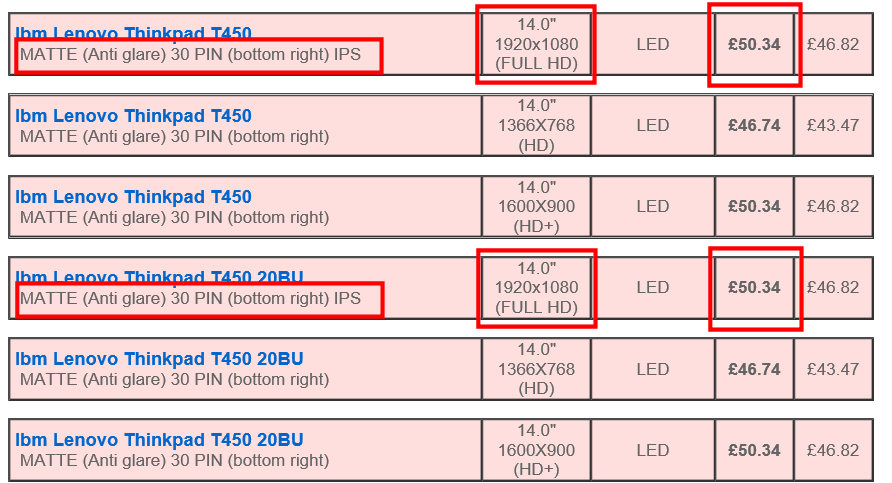 The highlighted models are all the same part.
You should choose the same resolution, connector position and connector type as your original screen. If there are higher refresh rates you can only use these if the connector is the same as your original screen. Connector size (pins), position and pitch (if specified) are extremely important. If there are more than 1 screen for your computer, with the same resolution, it maybe best to remove the old screen from the laptop, and search by the
screen model number.
This will ensure that you receive a product that is guaranteed to work. Upgrading may not work, as the higher spec screen may require a better cable, or may have a different connector, or different mountings. If you are unsure which resolution of screen you have, you can find this out from the manufacturer's website, usually using the serial number of your laptop. The receipt for your computer may also give the resolution. Don't use an external monitor to find out, as you'll get the resolution of the external screen from Windows, and not the internal one. It's probably best to remove the old screen from the laptop, if you still can't work it out, and search our website for the screen part code.
Here is some help in removing the old screen, and
here is some help identifying the screen part code or model number.
This blog article explains everything you need to know about the screen connector. Basically, the screen you buy has to have the same connector size, (number of pins) and connector positon (left, middle, right) as your original screen.
People always argue with us about this point, but
screen connector position is taken from the BACK of the display - not the front! This means if you are looking at the front of the screen, and the cable from under the keyboard comes up the left hand side of the screen, this is a right connector screen. You need to remove the screen to see the connector from the back.
This article explains resolutions. Essentially, you *may* be able to upgrade resolution, if you find a higher spec screen with the same connector pin count, and position as the original. It's hit and miss, however, as it depends on the cable the manufacturer fitted. We don't supply cables, nor can we tell you if your cable will allow an upgrade. Everything we know about upgrading, is in
this blog article here.
If you want to be sure that you will not have to return the product, don't try to upgrade!
See also: 'There are variations of my screen with diferent revisons' and 'I found my laptop model, but there are lots of them!'
If it is available to buy, we have it in UK stock. The product page will show you the delivery options.
If the item is showing as out-of-stock, we don't have it. Please don't ask us, as we are unable to make an order for a single item, on your behalf. Once we've found a supply of the product (if we can), the item will come back into stock on our website.
The best thing to do is check back in a few weeks, if you still have not found what you need elsewhere.
This either means that we are not sure which screen model is fitted inside your computer, or that your computer may have multiple types of screen, that are not interchangeable. We need you to remove the old screen, and give us the part code from the back of the display.
At the bottom of the product page, there is a form where you can do that. You'll also find information, to help you identify the screen part code.
There maybe a specific video, to show you how to remove the screen, on the product page, otherwise we have a
generic video you can watch.
Are you sending a genuine XYZ brand / model screen?
Who makes screens?DELL, Lenovo, HP, Acer, ASUS and friends do not manufacture screens. Nor do they manufacture the processor or hard disk drives, keyboards or video cards inside the laptops. Like the hard disks (made by Western Digital, Seagate), and the video cards (made by ATI, Nvidia and Intel), the screens are made by a handful of East Asian producers, usually in or around China. Although people like HP, Lenovo and DELL may have their own part codes for screens, you are best advised to search for the manufacturer's part code.
See also:
identifying screen model number. (We list screen manufacturer codes here along with codes by laptop makers such as DELL, Lenovo, HP).
Can I have the same brand / model of screen as my original?Depends if it is currently in circulation (production / supply) or not. This affects all screen suppliers and the laptop manufacturer's as well which is why they have multiple part codes for screens to fit your laptop.
All screen suppliers must work with compatible screen models, or what's currently available. In fact, even your original screen is a compatible model. Your computer will take various brands and models of screens, as the manufacturer, like us, will have had to use available parts at the time of assembly of your computer. For this reason we say 'compatible with AUO', 'compatible with LG', 'compatible with Samsung', etc) our product descriptions, and we talk in more depth about it
here. The article explains in depth why manufacturers, and screen suppliers use different parts for the same computer.
If we are offering a part for sale, the part we send will have been tested for compatibility. There are some rare occasions whereby compatibility issues can occur, we talk more about that in our
Post-Sales support help, where we offer solutions to these issues.
If you are specifically looking for an exact part code of screen:For
reasons already explained, we cannot guarantee any particular part code. This is due to the amount of stock we hold, (over a quarter of a million part codes), and the volume of screens we despatch. We may send you the exact part code you ordered, a variation of that model from the same manufacturer, or a different brand of screen - depending on market availability.
Please don't ask us for specifics about which part code we are sending as we are unable to reply to these enquiries.
If we don't list it, or we have the screen but say 'without touch glass', in the product descriptions, then we don't have it, sorry. We explain why in more detail, and why it is best to avoid touch screen laptops, in this
blog article.
See also: 'I have a touch screen, I am confused!' in our
Technical Section.
Where to go next?You can try
EET Group for most parts for all brands.
For HP, you can try
HP PartSurfer directly.
For Lenovo, you can try directly at
Lenovo FRU Parts or search for
Lenovo spare parts as many sellers have these.
For Toshiba, you can try
IPC-Computer Toshiba Parts.
For ASUS, you can try
AsusParts.eu or
ASUS Accessories.
EET Group has the largest selection of parts for various brands and is good for brands like Acer, Samsung, Clevo, and others.
Please note, these companies are not affiliated with us, so you will need to do your own research into their service, look at reviews and contact them before you make a decision to buy.
We list up over a quarter of a million screen part codes on our website. To supply all of these different part codes to you, we
must use a stock of 'compatible screens'. It's just not possible to find all these exact part codes, and most of them are no longer made anyhow.
All screens are compatible screens,
even your original screen, and the laptop makers work in the same way.
This means during the course of manufacture, the laptop maker will have used different screen models, depending on what is available at the time of assembly. We talk about this in more detail
here.
You may see your screen model listed several times on our site, with different revisions, versions or hardware numbers. Sometimes different revisions are all the same specification of screen, sometimes there are differences. You need to keep an eye on the price, and technical data like connector size and position, which we list on our product pages. Using this method, you will be able to see which screens are the same as each other.
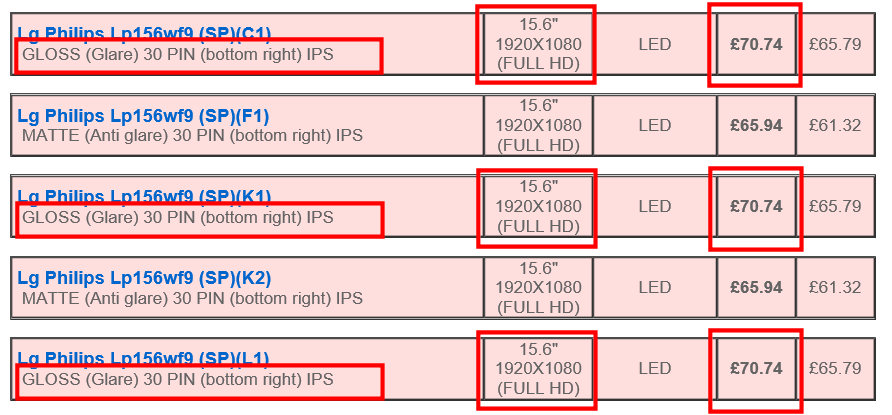 For the screens highlighted in red, we will send the same compatible part to you.
Please don't ask us about sending a specific version, as we are unable to do that, which is explained in detail
here.
When it comes to making laptop models, companies like HP, ASUS and Lenovo - love to produce endless models with the same specification. You may find that when you search for your laptop model, you find something like this.
In this example, we have a Lenovo T450, and the search results return several models. By looking at the specifications and price, on each product page, we can see there are essentially 3 different screens in all of these models.
You will need to identify which of these 3 types, are fitted to your model, and then you can choose any of the listings that match your type, as they are all the same thing.
Upgrading may not work, as the higher spec screen may require a better cable, or may have a different connector, or different mountings. If you are unsure which resolution of screen you have, you can find this out from the manufacturer's website, usually using the serial number of your laptop. The receipt for your computer may also give the resolution. Don't use an external monitor to find out, as you'll get the resolution of the external screen from Windows, and not the internal one. It's probably best to remove the old screen from the laptop, if you still can't work it out, and search our website for the screen part code.
Here is some help in removing the old screen, and
here is some help identifying the screen part code or model number.
We only supply laptop screens.
Where to go next?You can try
EET Group for most parts for all brands.
For HP, you can try
HP PartSurfer directly.
For Lenovo, you can try directly at
Lenovo FRU Parts or search for
Lenovo spare parts as many sellers have these.
For Toshiba, you can try
IPC-Computer Toshiba Parts.
For ASUS, you can try
AsusParts.eu or
ASUS Accessories.
EET Group has the largest selection of parts for various brands and is good for brands like Acer, Samsung, Clevo, and others.
Please note, these companies are not affiliated with us, so you will need to do your own research into their service, look at reviews and contact them before you make a decision to buy.